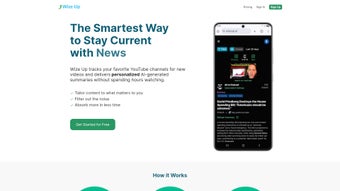

Download Wize Up – AI‑Powered YouTube Summarizer for Fast, Personalized Insights
Overview: Why Wize Up Is the Smart Choice for Busy YouTube Fans
In a world where video content explodes faster than we can watch, staying up‑to‑date with favorite YouTube creators can feel impossible. Wize Up tackles this problem head‑on with an efficient AI summarizer that converts new videos into concise, readable digests. Whether you’re a professional juggling multiple projects, a student needing quick research, or simply someone who wants to keep tabs on niche channels without spending hours in front of a screen, Wize Up offers a tailored solution.
The service works as a web‑based application that pulls the latest uploads from channels you subscribe to, then uses advanced natural‑language processing to generate summaries that respect your chosen tone, length, and language. You can receive these summaries in a daily email digest or view them directly inside the app. The platform also includes a “browse popular channels” section, giving you instant access to non‑personalized summaries across a variety of categories—from tech reviews to cooking tutorials.
What truly sets Wize Up apart is its flexibility. Users can adjust the summary structure (bullet points, narrative, or headline style), set relevance filters (skip videos that don’t match specific tags or categories), and even specify a preferred language, making it ideal for multilingual audiences. Clickable timestamps are embedded in each summary, allowing you to jump straight to the most relevant segment of the original video on YouTube with a single tap.
Security and privacy are baked into the design. All data transfers are encrypted with TLS 1.3, and the platform does not store your personal viewing history beyond what is required for delivering personalized summaries. As a free‑to‑use service with optional premium upgrades for higher‑frequency updates, Wize Up balances accessibility with powerful AI capabilities, positioning itself as the go‑to tool for anyone who values time and knowledge equally.
Key Features & Benefits of Wize Up
- AI‑Generated Summaries: Uses state‑of‑the‑art transformer models to create accurate, context‑aware digests of any YouTube video.
- Personalized Structure: Choose between bullet points, narrative flow, or headline format to match your reading style.
- Multi‑Language Support: Summaries can be generated in English, Spanish, French, German, and many other languages.
- Custom Relevance Filters: Exclude videos by tag, category, or date range, ensuring only the most relevant content reaches you.
- Clickable Timestamps: Jump directly to key moments within the original video with a single click.
- Daily Email Digest: Receive a consolidated summary of all new videos from your selected channels every morning.
- Browse Popular Channels: Access non‑personalized summaries from trending creators across multiple genres.
- Secure Data Handling: End‑to‑end encryption and strict privacy policies protect your subscription data.
- Cross‑Platform Access: Currently available as a responsive web app; Android and iOS apps are slated for release later this year.
- Scalable Premium Plans: Upgrade for faster update intervals, unlimited channel subscriptions, and priority support.
Beyond the raw feature list, Wize Up delivers tangible benefits that improve daily workflows. By converting video content into bite‑size text, you can skim multiple creators’ updates in the time it normally takes to watch a single video. This not only saves time but also enhances information retention; research shows that reading concise summaries improves recall compared to passive video consumption.
For professionals, the ability to set relevance criteria means you can align the tool with specific project goals—say, tracking only “machine‑learning tutorials” from a set of educational channels. Marketers gain a competitive edge by quickly identifying emerging trends without digging through endless playlists. Students can extract lecture highlights from educational YouTubers, turning hours of video into a quick study guide.
The inclusion of daily email digests integrates seamlessly with most productivity pipelines. Whether you use Outlook, Gmail, or a dedicated RSS reader, the digest can be forwarded, archived, or even fed into AI note‑taking tools for further processing. In short, Wize Up turns the overwhelming flood of YouTube content into a manageable, actionable knowledge base.
Installation & Daily Workflow: Getting Started with Wize Up
Getting up and running with Wize Up is intentionally straightforward, reflecting the product’s focus on speed and convenience. Follow these steps to integrate the summarizer into your daily routine:
- Create an Account: Visit wizeup.com and click “Sign Up.” You can register using an email address or connect via Google or Apple ID for instant authentication.
- Link Your YouTube Channels: After logging in, navigate to the “Channels” tab. Use the “Add Channel” button to search for or paste the URL of any YouTube channel you follow. You can add unlimited channels in the free tier, though premium plans allow faster processing.
- Set Summary Preferences: In the “Settings” menu, choose your preferred summary style (bullet, narrative, or headline) and language. Adjust the length slider to define how many sentences each summary should contain, ranging from a quick 2‑sentence snapshot to a detailed 8‑sentence overview.
- Configure Relevance Filters: Use the “Filters” section to specify tags, categories, or date ranges you wish to include or exclude. For example, you might filter out “vlog” tags while keeping “tutorial” tags for a tech channel.
- Enable Daily Digests: Turn on the “Email Digest” toggle and provide an email address. Choose the delivery time that best fits your schedule—most users opt for early morning to start the day informed.
- Explore Summaries: Return to the dashboard to view freshly generated summaries. Each entry displays a headline, the AI‑crafted summary, and clickable timestamps. Clicking a timestamp opens the original YouTube video at the exact moment referenced.
- Mobile Access (Future): While the web app works on any modern browser, the upcoming Android and iOS apps will sync your preferences and deliver push notifications for new summaries.
In practice, a typical day might look like this: After waking up, you glance at your inbox and skim the Wize Up digest, which lists 5‑7 key takeaways from your favorite tech channels. Intrigued by a particular point, you click the associated timestamp and watch only that 30‑second clip, saving the rest of the video for later. Throughout the day, you can return to the web dashboard for quick reference or share a summary with colleagues via the built‑in “Share” button, which creates a short link that includes the timestamped video segment.
The workflow is deliberately designed to minimize friction. No manual copying of video URLs is required; once a channel is linked, Wize Up automatically monitors new uploads, generates summaries, and pushes them to your chosen channels. This automation frees you from repetitive tasks, allowing you to focus on the content that truly matters.
Compatibility, Pros & Cons: Is Wize Up Right for You?
Supported Platforms: Wize Up is built as a responsive web application, meaning it works on any device with a modern browser (Chrome, Firefox, Safari, Edge). While native mobile apps are slated for release on Android and iOS later this year, the current web version offers full functionality on smartphones, tablets, and desktops. Minimum system requirements are modest: any device capable of running HTML5 and JavaScript, with at least 2 GB of RAM for optimal performance.
Pros
- Time‑Saving: Summaries condense lengthy videos into minutes of reading.
- Highly Customizable: Users control summary length, style, language, and relevance filters.
- Clickable Timestamps: Direct navigation to key video moments eliminates wasted viewing.
- Secure & Private: End‑to‑end encryption and a clear privacy policy protect user data.
- Cross‑Device Access: Responsive web design ensures consistent experience on any device.
- Free Tier Available: No upfront cost for basic usage; premium upgrades optional.
Cons
- Mobile Apps Not Yet Released: Users must rely on the web interface until Android/iOS apps launch.
- Processing Lag for High‑Volume Users: Free tier may experience slower summary generation during peak times.
- Limited Offline Access: Summaries are generated online; no native offline storage.
- Potential AI Misinterpretation: As with any automated summarizer, occasional inaccuracies can occur, especially with heavily visual content.
Overall, the benefits of Wize Up outweigh its current limitations, especially for users whose primary need is rapid knowledge extraction rather than deep video analysis. The roadmap promises native mobile apps, which will close the most significant gap in the current offering. For now, the platform delivers a reliable, secure, and highly adaptable solution that can be accessed from virtually any device.
Wize Up transforms the way busy professionals consume YouTube content. Its AI summarizer is impressively accurate, and the ability to filter by tags keeps the feed relevant. While the lack of native mobile apps is a temporary drawback, the web experience is smooth and responsive. The daily email digest is a game‑changer for staying informed without video overload.
Frequently Asked Questions
How does Wize Up generate its summaries?
Wize Up leverages a transformer‑based language model trained on millions of video transcripts. When a new video is detected, the service extracts the transcript (or auto‑generated captions), feeds it to the AI engine, and produces a concise summary based on your selected length and style preferences.
Is my YouTube subscription data safe?
Yes. All data transmission is encrypted with TLS 1.3, and Wize Up stores only the minimal information required to generate summaries. Personal viewing habits are never sold to third parties, and you can delete your account and associated data at any time.
Can I use Wize Up on my smartphone without an app?
Absolutely. The web application is fully responsive and works on mobile browsers. The upcoming native Android and iOS apps will provide push notifications and offline caching, but the current web version already offers a smooth mobile experience.
What languages are supported for summaries?
Wize Up currently supports English, Spanish, French, German, Italian, Portuguese, Dutch, Russian, Japanese, and Korean. Additional languages are being added as the AI model expands.
Do I need a premium subscription to use Wize Up?
No. The free tier allows unlimited channel subscriptions and daily summaries, though processing may be slower during high‑traffic periods. Premium plans unlock faster update intervals, unlimited summary length, priority support, and early access to mobile apps.
Conclusion & Call to Action
If you spend more time scrolling through YouTube than actually absorbing the information you need, Wize Up is the tool that bridges the gap between video abundance and knowledge efficiency. By turning hours of video into succinct, searchable text, it empowers busy professionals, students, and casual viewers alike to stay informed without sacrificing valuable time. The platform’s customizable filters, multilingual support, and secure architecture make it a trustworthy addition to any productivity stack.
Ready to reclaim your time? Visit the Wize Up website today, create a free account, and start receiving AI‑crafted summaries of your favorite YouTube channels within minutes. Keep an eye out for the upcoming Android and iOS apps to enjoy push notifications and offline access. With Wize Up, the future of video consumption is concise, personalized, and effortlessly efficient.



.png)



